

Public API
Use it when you want an agent behind a backend job, a webhook, a support tool or any language that can make an HTTP request. It is the simplest way to put a Studio agent into production outside the Studio UI.
Base URL
https://{STUDIO_HOST}/api/v1/agents/{agentId}/runsThe same routes are also served under the app base path
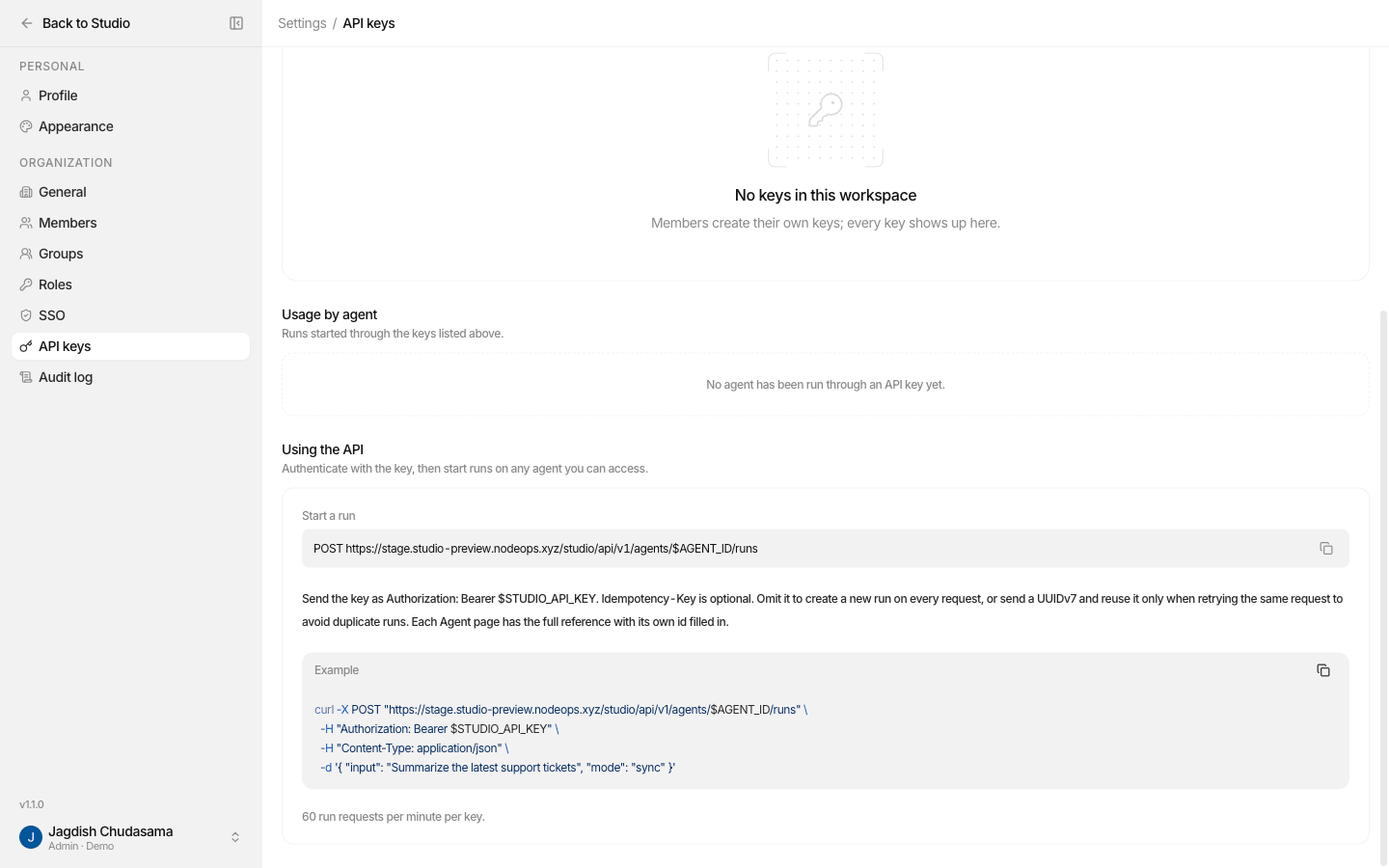
(https://{STUDIO_HOST}/studio/api/v1/agents/{agentId}/runs), which is the URL
shown in Settings → API keys. Both behave identically.
Authentication
Send your key as a bearer token:
Authorization: Bearer studio_xxxxxxxxxxxxxxxx| Rule | What happens otherwise |
|---|---|
The token must start with studio_ | 401 invalid_api_key |
| Never put a key in the query string | 400 credential_in_query. The request is refused even if the key is valid. |
| The person who created the key must still be a member of the organization | 401 invalid_api_key |
| The key's owner needs at least Viewer on the agent | 404 resource_not_found |
| The agent must be Active (published) | 409 conflict, "Only active agents can run" |
The routes
| Method and path | Does |
|---|---|
POST /runs | Start a run |
GET /runs/{runId} | Read a run |
GET /runs/{runId}/events | Stream a run's events (SSE), resumable |
POST /runs/{runId}/respond | Answer a question the agent asked |
POST /runs/{runId}/cancel | Stop a run |
All paths are relative to /api/v1/agents/{agentId}.
Start a run
curl -X POST "https://$STUDIO_HOST/api/v1/agents/$AGENT_ID/runs" \
  -H "Authorization: Bearer $STUDIO_API_KEY" \
  -H "Content-Type: application/json" \
  -H "Idempotency-Key: 01928f3e-7b6a-7c1d-9a2b-3c4d5e6f7a8b" \
  -d '{ "input": "Summarise the Q3 revenue report.", "mode": "sync" }'
Body
| Field | Type | Notes |
|---|---|---|
input | string, required | 1 to 1,000,000 characters after trimming. |
mode | sync | async | stream | Default sync. See below. |
sessionId | UUID v7, optional | Continue an existing conversation. Omit it to start a new session. |
Unknown fields are rejected. The body is capped at 4 MB.
The three modes
| Mode | Returns | Use when |
|---|---|---|
| sync (default) | Waits up to 60 seconds. 200 with the finished run (or one awaiting input). If it is still running after 60 s, 202 with the current run and a Location to poll. | Short answers, simple scripts |
| async | 202 immediately with the run. Poll GET /runs/{runId} or open the event stream. | Background jobs, long agents |
| stream | 200 text/event-stream, the run's events as they happen. | Chat UIs that show the answer as it is written |
Response headers
| Header | Meaning |
|---|---|
X-Request-Id | req_.... Quote it when asking for support. |
Idempotency-Key | The key used, yours or one generated for you. |
Location | URL of the run. |
X-RateLimit-Limit / -Remaining / -Reset | Your rate-limit budget. |
The run object
{
  "id": "0192…",
  "agentId": "0192…",
  "sessionId": "0192…",
  "status": "succeeded",
  "output": "Q3 revenue grew 12%…",
  "error": null,
  "usage": { "inputTokens": 1840, "outputTokens": 312, "costUsd": 0.0041 },
  "pendingInputs": [],
  "createdAt": "2026-10-26T09:12:03.000Z",
  "completedAt": "2026-10-26T09:12:09.000Z"
}| Status | Meaning |
|---|---|
running | The agent is working. |
awaiting_input | Paused. pendingInputs lists what it is asking. |
succeeded | Finished. output holds the answer. |
failed | error holds a code and message. A guardrail block arrives here as guardrail_blocked, not as an HTTP error. |
cancelled | Someone stopped it. |
Streaming
Both mode: "stream" and GET /runs/{runId}/events return Server-Sent Events.
Every frame carries an id (its index), an event name and JSON data.
| Event | Data | Do |
|---|---|---|
run.started | The run | Store id and sessionId |
output.text.delta | { delta } | Append to the visible answer |
run.input_requested | { requestId, input } | Ask the human, then call /respond |
run.completed / run.failed / run.cancelled | The final run | Render the result or the error |
error | { code, message, requestId } | The stream broke; reconnect |
A : heartbeat comment is sent every 15 seconds so proxies keep the connection
open.
Answer a question
When a run is awaiting_input:
curl -X POST "https://$STUDIO_HOST/api/v1/agents/$AGENT_ID/runs/$RUN_ID/respond" \
  -H "Authorization: Bearer $STUDIO_API_KEY" \
  -H "Content-Type: application/json" \
  -d '{ "requestId": "req_123", "response": { "optionId": "approve" } }'
response is either a plain string, or an object with optionId and/or text
(at least one). The run continues and the call returns the updated run.
Cancel a run
curl -X POST "https://$STUDIO_HOST/api/v1/agents/$AGENT_ID/runs/$RUN_ID/cancel" \
-H "Authorization: Bearer $STUDIO_API_KEY"Idempotency
Send an Idempotency-Key header (a UUID v7) when starting a run.
- Same key, same body → you get the same run back. A network retry is always safe.
- Same key, different body →
409 conflict. - No key → Studio generates one, so every request starts a new run.
Rate limits
- Starting a run is limited per key, by default 60 requests per minute (fixed one-minute window). Your deployment may set a different value; it is shown in Settings → API keys.
- Over the limit you get
429 rate_limit_exceededwith aRetry-Afterheader. - Reading, streaming, responding and cancelling are not rate limited.
Errors
Errors use RFC 7807 application/problem+json:
{
  "type": "about:blank",
  "title": "Bad Request",
  "status": 400,
  "detail": "Request body failed validation",
  "code": "validation_error",
  "requestId": "req_0192…",
  "errors": [{ "field": "input", "message": "Required" }]
}| Status | Codes |
|---|---|
400 | invalid_json, validation_error, invalid_agent_id, invalid_resource_id, invalid_idempotency_key, credential_in_query, invalid_last_event_id, invalid_request |
401 | invalid_api_key |
403 | permission_denied |
404 | resource_not_found. Also returned when the agent exists but you cannot reach it, so ids cannot be probed. |
409 | conflict: agent not active, session already has an active run, run not awaiting input, idempotency key reused with a different body |
413 | payload_too_large |
429 | rate_limit_exceeded |
500 | internal_error |
503 | dependency_unavailable. Safe to retry with the same idempotency key. |
What the Public API does not do
- It does not list agents or sessions. Use the MCP server or the Studio APIs for that.
- It does not create or edit agents. Build them in Studio, publish, then call them here.
Production checklist
- The key lives in a backend secret manager, never in a browser or mobile app
- Every run start sends an
Idempotency-Key, and retries reuse it -
awaiting_inputis handled, or human-in-the-loop agents will look stuck -
failedwithguardrail_blockedis shown as a policy message, not a crash -
429backs off usingRetry-After - Streams reconnect with
Last-Event-ID -
X-Request-Idis logged on your side