

MCP server
Endpoint
https://{STUDIO_HOST}/mcp| Property | Value |
|---|---|
| Transport | Streamable HTTP, stateless, JSON responses (POST only) |
| Authentication | OAuth 2.1 with PKCE and dynamic client registration. API keys are not accepted. |
| Discovery | /.well-known/oauth-protected-resource/mcp and /.well-known/oauth-authorization-server |
| Server name | createos-studio |
Connect a client
Add Studio as a remote MCP server pointing at https://{STUDIO_HOST}/mcp. The
client registers itself and opens your browser to sign in. For example, in a
client that reads an mcpServers config:
{
  "mcpServers": {
    "createos-studio": {
      "url": "https://{STUDIO_HOST}/mcp"
    }
  }
}
Clients that only support local (stdio) servers need a remote bridge such as
mcp-remote.
What you see in the browser
- Sign in to Studio as usual.
- Choose an organization. The connection reaches only that organization.
- Consent. Studio shows the app's name and the organization, with one checkbox per permission. Tick what you are comfortable with and click Allow access, or Deny.
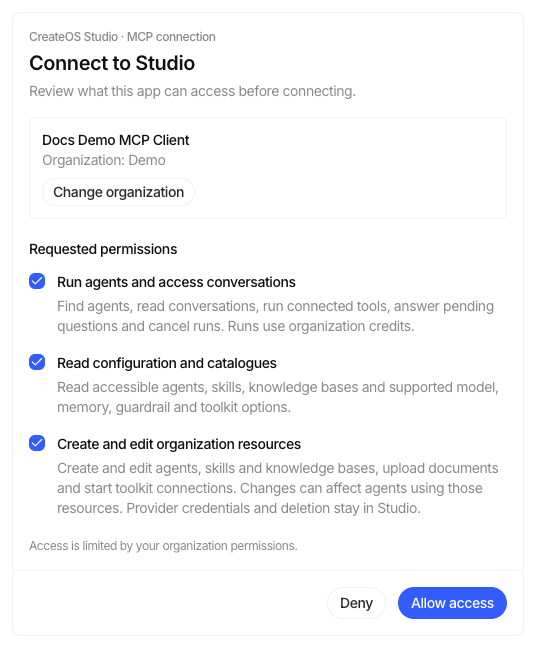
Permissions
| Scope | Shown as | Grants |
|---|---|---|
studio:agents | Run agents and access conversations | Find agents, run them, read your conversations, answer pending questions, cancel runs. Runs use your organization's credits. |
studio:management:read | Read configuration and catalogues | Read agents, models, skills, knowledge bases, toolkits, memory and guardrail connections. |
studio:management:write | Create and edit organization resources | Create and update agents, skills and knowledge bases; attach things to agents; upload documents; start a toolkit connection. |
offline_access | Keep this connection active | A refresh token, so you do not have to reconnect every few minutes. Unticked by default. |
Never possible through MCP: deleting anything, or sending provider credentials. Those stay in the Studio UI.
Tools
Running agents (studio:agents)
| Tool | Does |
|---|---|
list_agents | Find agents you can reach. Archived agents are hidden; only Active ones can run. |
list_sessions | Your sessions with an agent, newest first. |
get_session | A session's runs and messages, in order. |
run_agent | Start a run (message up to 100,000 characters). Returns at once; poll with get_run. Reusing a requestId returns the same run. |
get_run | Status, output, usage, and any questions waiting for an answer. |
respond_to_run | Answer a question the agent asked. |
cancel_run | Stop a run. |
Reading configuration (studio:management:read)
get_agent, list_models, get_model, list_skills, get_skill,
list_knowledgebases, get_knowledgebase, list_toolkits, get_toolkit,
list_memory_connections, get_memory_connection,
list_guardrail_connections, get_guardrail_connection.
Building (studio:management:write)
| Tool | Does |
|---|---|
create_agent | Create an agent with its goal, instructions, model, output format, memory, guardrail, skills, knowledge bases and toolkits, and optionally publish it. |
update_agent | Change an agent. Uses the agent's last-updated time as a lock, so it will not overwrite someone else's edit. |
attach_to_agent / detach_from_agent | Add or remove a skill, knowledge base or toolkit. |
manage_skill | Create or update a skill (content up to 1 MB). |
manage_knowledgebase | Create or update a knowledge base. Embedding settings lock once documents are processing. |
prepare_document_upload / complete_document_upload | Upload up to 20 files (100 MB each) into a knowledge base. |
connect_toolkit | Returns a link that you open to connect an app. The credential never passes through the MCP client. |
Limits
| Limit | Value |
|---|---|
| Request body | 10 MB |
| Page size for list tools | 1 to 20, default 10 |
| Long text (outputs, conversations) | Returned in 8,000-character windows; ask for the next offset |
run_agent rate | Same per-minute limit as API keys (default 60), counted per connection |
| Browser-based clients | Requests from a different web origin are refused |
What gets recorded
Every management call is written to the Audit logs with the transport marked as mcp and the connection it came from. Runs appear in Audit traces like any other run.