

Triggers and schedules
| Start | Step | Shown in traces as |
|---|---|---|
| By hand | Trigger | Manual |
| On a timetable | Schedule | Schedule |
| From another workflow | Trigger, called by an Execute Workflow step | Child of workflow |
Trigger: run by hand
The Trigger step defines what a person (or a parent workflow) must supply to start a run.
- Add a Trigger step. A workflow has at most one.
- Add inputs. Each has a name (letters, digits, underscores), a label, a type, whether it is required, and an optional default.
| Input type | Shown as |
|---|---|
| text / long text | A text box |
| number | A number field |
| yes/no | A switch |
| date | A date picker |
| select | A dropdown of your options |
| JSON | A code box |
When someone clicks Run workflow, they fill in a form built from these
inputs. The values are checked against the types before the run starts, and
arrive on the first item as {{ $json.<name> }}.
With no inputs defined, a Trigger accepts any JSON object.
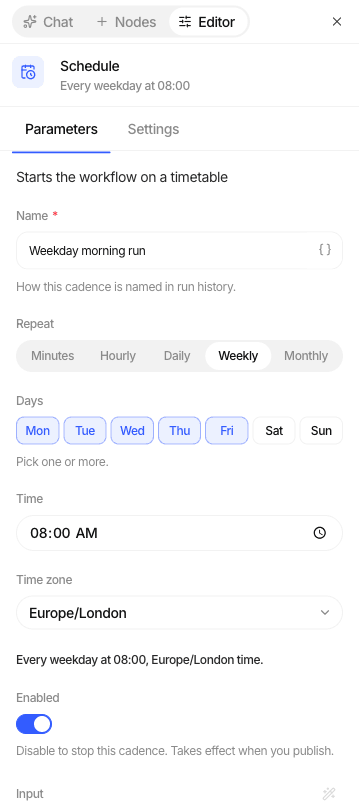
Schedule: run on a timetable
| Frequency | You set | Example |
|---|---|---|
| Every few minutes | Every 1 to 30 minutes | Every 5 minutes |
| Hourly | Minute past the hour | At :15 |
| Daily (default) | Time (24-hour) | 09:00 |
| Weekly | Days of the week and time | Mon, Wed, Fri at 09:00 |
| Monthly | Day of the month and time | The 1st at 07:30 |
Every schedule also has a name, a timezone (default UTC; daylight saving is handled), an enabled switch, and an optional input object handed to the first step.
A workflow can have several Schedule steps, for example one for weekdays and one for month end.
How schedules behave
| Situation | What happens |
|---|---|
| Normal | The run starts within about a minute of the scheduled time. |
| The previous run is still going | That slot is skipped. Runs never pile up. |
| Studio was down over several slots | Only the most recent missed slot runs on recovery. |
| A run failed | It is not repeated. The next slot runs as normal. |
| Months shorter than the chosen day (e.g. the 31st) | Those months are skipped. |
Whose access a scheduled run uses
Calling one workflow from another
Add an Execute Workflow step and pick a published workflow. It runs once per item, starting at the child's Trigger, and the parent waits for it.
- You need Editor on the child workflow.
- Up to 5 levels of nesting; a workflow cannot end up calling itself.
- A failed child fails the step in the parent.
- To stop a child run, cancel the parent run that started it.