

Running and monitoring
Run a workflow
Open a published workflow whose canvas matches the published version. The button reads Run workflow. Fill in the Trigger's inputs and start it.
You need Editor on the workflow to run it.
Run states
| State | Meaning |
|---|---|
| Running | Steps are executing. |
| Waiting | Paused on an approval or a Wait step. Survives restarts and deploys. |
| Completed | Finished. |
| Failed | A step failed and was not handled, or the run hit its timeout. |
| Cancelled | Someone stopped it. |
Each step has its own state too: pending, running, succeeded, failed, waiting, or skipped (its branch was not taken, or it is set to Skip).
When a step fails
| Control | Where | Use for |
|---|---|---|
| Retry on fail | Step → Settings | Flaky APIs and rate limits. 2–10 tries, 0–30 s apart. |
| Error output | Step → Settings → On error | Handling a known failure: a guardrail block, a 404, a rejected record. You must connect the error port. |
| Continue on error | Workflow settings | Batch jobs where one bad item should not stop the rest. |
| Stop & Error | A step | Failing deliberately with a clear message. |
Cancel
Stop a run from the builder's top bar or Runs view. Cancelling stops further steps; it does not undo actions already taken. Child runs started by Execute Workflow are cancelled by cancelling the parent.
Watching runs: workflow traces
Sidebar → Traces → Workflows tab.
| List | Detail |
|---|---|
| Workflow, started, trigger (Manual, Schedule, Child of workflow), duration, status. Filter by status, workflow and time window (last hour to all time). Search by workflow or run id. Select runs and Download JSON. | Timeline and Tree views of every step, step search, and each step's input and output items. It shows the exact published version that ran. |
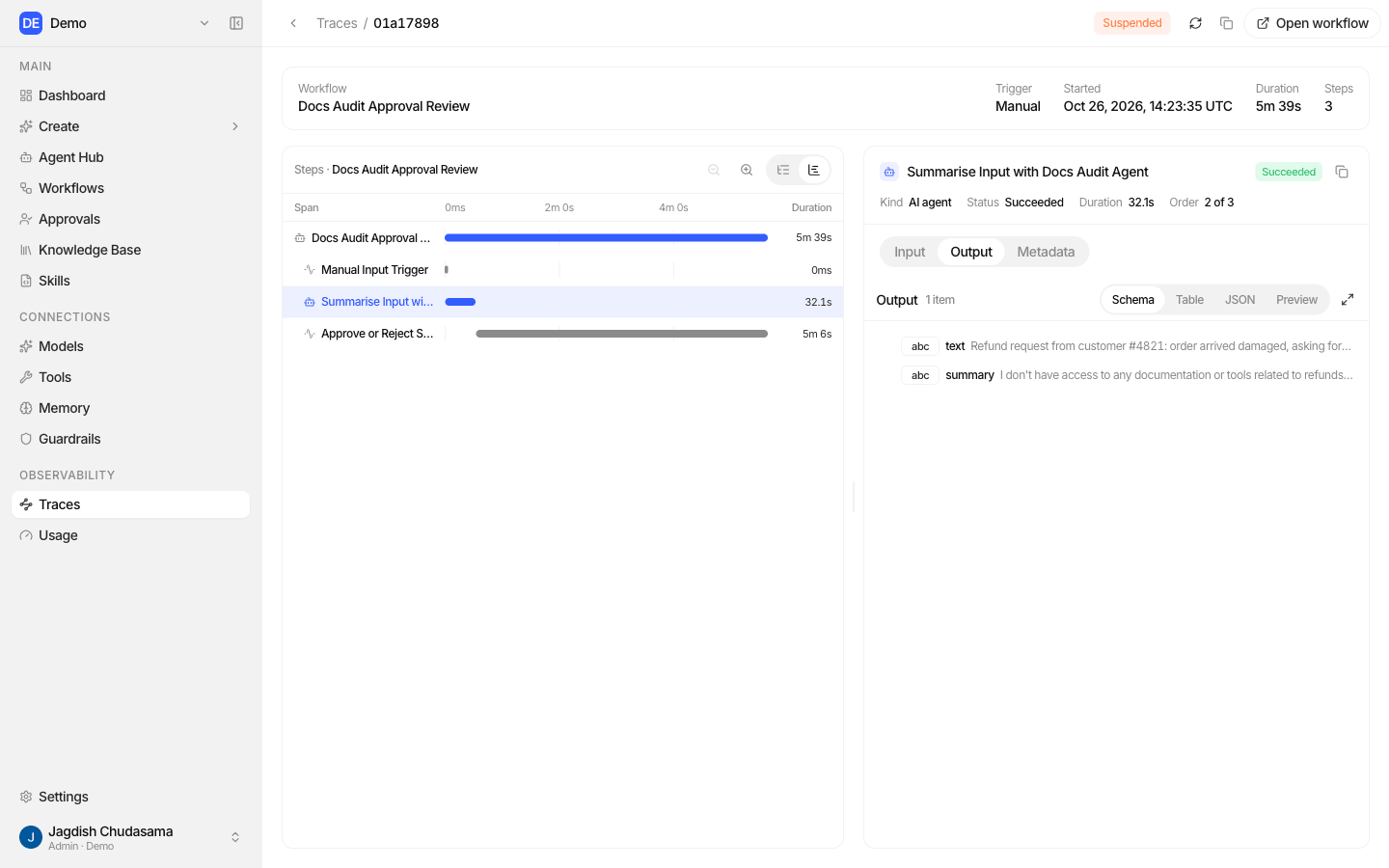
An AI Agent step also produces a normal agent run, with its own step waterfall in the agent Audit traces.
Reliability
- Runs are durable. Waits, approvals and in-progress steps survive restarts and deploys.
- A background sweep repairs runs that were interrupted, for example a run saved but never started, or an approval answer that did not reach its run.
- A step that crashes part way is retried by the engine. A step that calls an outside system may therefore occasionally run twice; prefer actions that are safe to repeat.
Limits
| Limit | Value |
|---|---|
| Run timeout (active time) | 1 hour default, up to 24 hours |
| One step | 5 minutes |
| Steps running at once in a run | 10 |
| Items a step processes at once | 5 |
| Loop passes | 1,000 by default |
| Workflow nesting | 5 levels |
| Retries per step | Up to 10 tries |
| HTTP Request | 30 s, 5 MB, 5 redirects |
| Approval | 50 users, 20 groups, 20 roles, 6 decisions, 20 fields |
| Schedule | Every minute at most |
What gets recorded
| Event | Audit action |
|---|---|
| Create, rename, edit the graph | workflows.create, workflows.update, workflows.graph.update |
| Publish, pause, resume, delete | workflows.publish, .pause, .resume, .delete |
| Start or cancel a run | workflows.runs.create, workflows.runs.cancel |
| Answer an approval | workflows.runs.resume |
| Bind or unbind an app account | workflows.toolkits.bind, .unbind |
| Share or unshare | resources.share, resources.unshare |
Scheduled runs and edits made by the Workflow assistant are recorded too, attributed to the person they act as.
Troubleshooting
| Symptom | Check |
|---|---|
| "Publish this workflow before running it" | It has never been published. Publish, then run. |
| Publish refused | Read the listed problems: unconnected error ports, missing models, a disabled step, an unsupported expression such as $node[…]. |
| Schedule never fires | Workflow is Active, the schedule is enabled, you republished after changing it, and the publisher is still a member. |
| If step fails with a missing path | The field is not on every item. Use is empty or fix the path. |
| Far more actions than expected | Fan-out. Check item counts in the Logs drawer; add Limit, Filter or Aggregate. |
| Run stuck in Waiting | An approval nobody answered. Check the Approvals page and the notification settings. |